
PESCO Online Bill Check | Download Duplicate Copy
Lost your paper bill, or it hasn’t arrived yet? Enter the 14-digit reference number from any old PESCO bill in the box below. Your current bill opens in a new tab on PITC’s official bill website, where you can view it, print it, or save it as a PDF.
Check Your PESCO Bill
Pescoebilling.pk is an independent website. It is not run by PESCO, PITC, or any government office. The box above sends your reference number straight to PITC’s official bill page, and the bill you see there comes directly from PITC. This website does not receive or save the number you enter.
The duplicate bill is the same bill PESCO issued for the month. It shows the units you used, your meter readings, the charges and taxes, the due date, and the amount payable after the due date. You don’t have to wait for the paper copy to pay, because banking apps and mobile wallets only need your reference number.
On bills issued since June 2026, the reference number is the first entry in the Consumer Detail box at the top of the bill, labelled Reference No (حوالہ نمبر). The image below shows where to look.
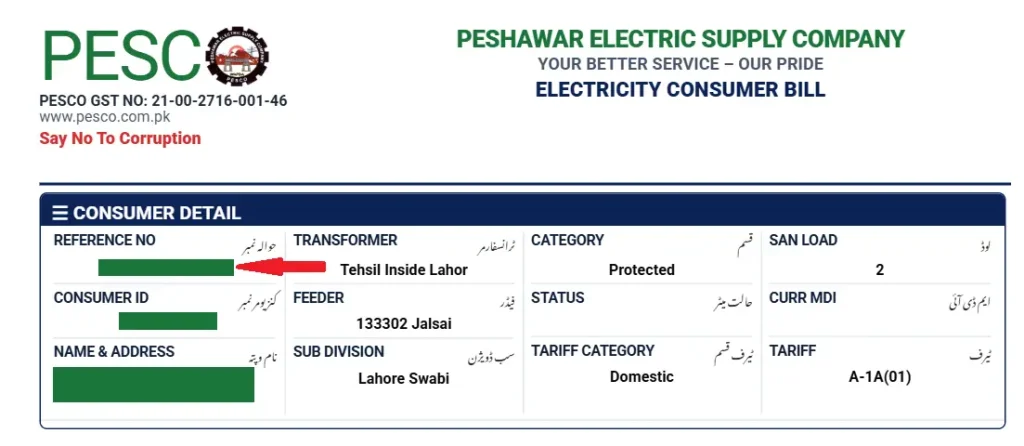
How to check your PESCO bill online
All you need is the reference number from any old PESCO bill. It normally stays the same from month to month, so an older bill works fine.
- Find the reference number on any old bill. On the new bill layout it is the first entry in the Consumer Detail box, as shown in the image above.
- Type the 14 digits into the box at the top of this page. Spaces and hyphens are removed automatically.
- Click “Check Bill”. Your bill opens in a new browser tab on PITC’s bill website.
- To save or print it on a computer, press Ctrl+P and choose “Save as PDF” or your printer. On a phone, use your browser’s Share or Print option.
- Per-unit prices change every year, so check the current PESCO unit rates before comparing this bill with an older one.
You can’t look up a bill with your CNIC or name. If you don’t have any old bill, ask your PESCO sub-division office for your reference number.
What is the PESCO bill reference number?
It is the 14-digit number that identifies your electricity connection. It is printed in three groups, for example 01 23456 1234567. The first 2 digits are the batch number, the next 5 are the code for your sub-division, and the last 7 are your account number. Some bills print a letter after the number, such as U or R.
What is the PESCO customer ID?
The customer ID, printed on the bill as Consumer ID (کنزیومر نمبر), is a separate 10-digit number. On the new bill layout it sits directly below the reference number in the Consumer Detail box. On older bills it was just above the reference number. The check box on this page works with the reference number, so use that number when checking your bill here.

Which areas get a PESCO bill?
PESCO supplies electricity across most of Khyber Pakhtunkhwa, including Peshawar, Mardan, Swabi, Swat, and Bannu. The Hazara region is no longer part of PESCO. Hazara Electric Supply Company (HAZECO) began operating independently on 1 July 2025, so homes in Abbottabad, Haripur, Mansehra, and the rest of Hazara now get their bills from HAZECO.
The company name printed at the top of your latest bill tells you which company supplies you. If it says HAZECO, a PESCO bill check may not find your bill.
How to check if your bill is paid
Your bill has a history table showing the bill amount and the payment received for each of the last 12 months. A payment shows up in that table on the bill issued after you pay. If a month shows 0 under payment even though you paid, keep your bank or wallet receipt and take it to your sub-division office.
You can open your latest bill through Pescoebilling.pk whenever you want to check this table. For a rough idea of next month’s amount, try our PESCO bill calculator.
How a PESCO bill is calculated: a real example
The numbers below come from a real PESCO domestic bill for July 2025, shared with the account holder’s personal details removed. The household used 172 units on tariff A-1a(01). Per-unit rates change every year, so the rates on your bill will be different, but the steps are the same.
1. Cost of electricity
This household stayed under 200 units every month, so it was billed at the lower protected rates, in two slabs.
| First 100 units | 100 × Rs 10.1106 | Rs 1,011.06 |
| Next 72 units | 72 × Rs 12.5807 | Rs 905.81 |
| Cost of electricity | Rs 1,917 (rounded) |
2. PESCO charges
The F.C. surcharge is charged per unit. On this bill it was 172 units × Rs 0.43 = Rs 73.96. The quarterly tariff adjustment was a credit of Rs 517.85, which lowered the bill. In other quarters this adjustment can be a charge instead. That gives PESCO charges of Rs 1,917 + Rs 73.96 minus Rs 517.85 = Rs 1,473.11.
3. Government taxes
Electricity duty was Rs 21, which is 1.5% of the cost of electricity after the quarterly adjustment (Rs 1,399.15). GST was Rs 269, which is 18% of the PESCO charges plus the electricity duty (Rs 1,494.11). The TV fee was Rs 0, because the Rs 35 PTV fee was removed from electricity bills in 2025. Government taxes came to Rs 290 in total.
4. Amount due and late payment
The bill came to Rs 1,473.11 + Rs 290 = Rs 1,763, due on 4 August. Paying between 5 and 7 August added a late payment surcharge of Rs 74, and paying after 7 August added Rs 147. On this bill, those amounts are about 5% and 10% of the PESCO charges.
Tips to reduce your electricity bill
For many homes, the biggest saving comes from staying at or below 200 units a month.
- Homes that use 200 units or less every month for six months in a row are billed at protected rates, which are much lower. Going over 200 units in a single month can cost you that status for the next six months. New bills show your status under Category in the Consumer Detail box.
- Look at the units column in your bill history to see which months push your usage up, then plan for those months.
- Replace old bulbs and tube lights with LED lights.
- Set air conditioners to around 26°C rather than lower temperatures.
- Switch off water pumps, heaters, and geysers when you don’t need them.
- If you use a lot of electricity, ask PESCO whether a time-of-use (TOU) meter suits you. These meters charge a higher rate at peak hours and a lower rate the rest of the day.
Electrical safety at home
Keep these rules in mind at home and outside.
- Don’t touch switches or appliances with wet hands.
- Stay away from fallen or hanging power lines and report them straight away to the PESCO helpline on 118.
- Don’t hang clothes on electric wires or tie animals to electricity poles.
- Use three-pin plugs for appliances such as irons, washing machines, and refrigerators, and get damaged wiring repaired by an electrician.
- If someone is getting an electric shock, don’t touch them with bare hands. Switch off the main switch if you can, or move them away from the source with a dry wooden object.
PESCO complaints
For power outages, faults, and billing complaints, call PESCO on 118 or send an SMS to 8118. Both numbers are printed on PESCO bills.
Your bill also lists phone numbers for your own SDO and XEN offices. Start there for local problems such as a wrong meter reading or a disputed bill. You can also register and track complaints online through the Customer Complaint Management System (CCMS), and PESCO bills name NEPRA’s Asaan Approach mobile app for complaints to the regulator.
Protected consumers and the subsidy QR code
In May 2026, the Power Division announced that bills for subsidized consumers will show the exact subsidy amount for that month. These bills carry a QR code, and consumers are asked to scan it and register through the online link so their eligibility can be confirmed. The Power Division said this is a verification step and that subsidies are not being withdrawn.
If you use 200 units or less a month, look for this QR code on your latest bill and complete the registration.
Can’t pay by the due date?
Go to your PESCO sub-division office before the due date. Officers can extend the due date or split a large bill into installments in some cases, depending on the amount and their approval limits. Ask which documents they need, and keep a copy of any approval you get.
Other charges you may see on your bill
Fuel price adjustment (FPA)
The FPA passes changes in the cost of fuel used to generate electricity on to consumers. NEPRA decides it, and depending on the month it can add to your bill or reduce it. The example bill above had no FPA. When an FPA appears, older-format bills list the taxes on it in a separate box, such as GST on FPA and ED on FPA.
Deferred amount and installments
A deferred or installment amount is part of an earlier bill that has been set aside to be paid later, for example under an installment arrangement. If you don’t recognise one on your bill, ask your sub-division office what it covers.
Income tax and further tax
Rows such as income tax, extra tax, further tax, and retailer sales tax were empty on the example domestic bill. They mostly apply to commercial and industrial connections and to some high domestic bills.
PESCO bill payment
You don’t need the paper bill to pay. In most banking apps, Easypaisa, and JazzCash, choose the electricity bill option, select PESCO, and enter your reference number. You can also pay in cash at bank branches.
Pay before the due date printed on your bill to avoid the late payment surcharge. For more ways to pay, see our PESCO bill payment guide.